How to Track Pantry Inventory: A Simple System That Actually Sticks
Most pantry inventory systems fail for the same reason: they are too complicated to keep up. You start with a beautiful spreadsheet, record every spice jar, and three weeks later the list no longer matches the shelves.
Over time I have settled on a much lighter approach. In this guide I share how I track pantry inventory, including the exact columns I use, how often I update it, and how it connects to emergency food storage so the two support each other.
Why Track Your Pantry at All?
A pantry inventory does three practical things:
- Stops duplicate buying. You know you already have four cans of tomatoes.
- Reduces waste. You can see what needs using soon.
- Shows your emergency coverage. You can tell at a glance whether you have a few days of food for everyone.
Official preparedness guidance also leans on regular checking. Ready.gov’s kit maintenance advice includes replacing expired items as needed (Build A Kit), and the USDA’s Food Safety and Inspection Service suggests you check your pantry every few weeks and use canned goods you have had on hand for a while. An inventory makes both easier.
Step 1: Decide What to Track (and What Not To)
The trick is to track categories that matter, not every item in the kitchen. I track:
- Shelf-stable proteins (canned fish, meat, beans, peanut butter)
- Canned fruits and vegetables
- Grains and starches (rice, pasta, oats, crackers)
- Ready-to-eat items (cereal, bars, dried fruit)
- Drinks and shelf-stable milk
- Bottled water
- Baby food or formula, and pet food, if relevant
- Special-diet items
I do not track spices, condiments, or open snack packets. Those change too often and add noise.
Step 2: Choose a Format
Any of these work:
- Spreadsheet – easy to sort by date and total up quantities
- Printed sheet on the pantry door – quick to update with a pen
- Notebook – zero setup
I use a spreadsheet for the master list and a printed “used it” sheet on the door. When someone takes the last can of something, they tick it on the paper. Once a week I update the spreadsheet from the sheet.
Step 3: Set Up Your Columns
Here are the columns I recommend. Keep it to these and the list stays manageable.
| Column | What to write | Why it helps |
|---|---|---|
| Item | “Canned chickpeas 400 g” | Clear identification |
| Category | Protein, grain, fruit/veg, etc. | Lets you see balance |
| Quantity | 6 | Shows stock at a glance |
| Target quantity | 8 | Tells you what to buy |
| Best-by date (earliest) | 2027-03 | Shows what to use first |
| Location | Hall closet, shelf 2 | Saves searching |
| Notes | “No-cook,” “kids like it” | Helps emergency planning |
About dates: The USDA explains that “Best if Used By” dates indicate best quality rather than safety for most foods (FSIS, Food Product Dating). I still record them, because they are the easiest way to decide what to use first. Infant formula is different: FSIS advises not to buy or use it after its “Use-By” date, so I flag formula in red.
Cans sometimes carry codes rather than readable dates. FSIS notes that can codes are not meant for consumers to interpret as “Best if Used By” dates. For those, I write the purchase month on the lid with a marker and record that instead.
Step 4: Do One Full Count
Set aside an hour. Take everything in your tracked categories off the shelf, wipe the shelf, and count as you put items back. While you are at it:
- Group like items together
- Put the earliest dates at the front
- Set aside anything damaged
FSIS advises discarding cans that are bulging, leaking or deeply dented, especially with a dent on a seam, and discarding heavily rusted cans (Shelf-Stable Food Safety). Do not taste food from a suspect can.
Step 5: Set Target Quantities
This is where inventory becomes emergency planning. For each category, decide how much you want on hand.
To set targets, I start from official guidance:
- Ready.gov recommends at least a several-day supply of non-perishable food.
- The American Red Cross recommends a 2-week supply of food for home and a 3-day supply for evacuation.
- For water, Ready.gov recommends at least one gallon per person per day for several days.
Then I think in meals. If my household eats a certain number of meals a day, how many cans, packets and portions does that mean for three days? For a week? I put that number in the “target” column. It does not need to be precise. A rough target is far more useful than none.
If you are building toward those targets on a tight budget, my guide on how to build an emergency pantry on a budget covers the buying side.
Step 6: Create a Shopping List Automatically
With “quantity” and “target” columns, your shopping list writes itself: anything where quantity is below target goes on the list. In a spreadsheet, a simple formula like =MAX(0, Target - Quantity) in a “to buy” column does the job. Sort by that column before you shop.
Step 7: Keep a Light Routine
This is the part that makes the system last. My routine:
Weekly (5 minutes)
- ☐ Transfer ticks from the door sheet to the spreadsheet
- ☐ Check the “to buy” column before shopping
Monthly (15 minutes)
- ☐ Glance at the earliest best-by dates
- ☐ Move anything getting close into the week’s meal plan
- ☐ Check bottled water and baby or pet food
Yearly (1 hour)
- ☐ Full recount
- ☐ Review targets (has the household changed?)
- ☐ Check water you filled yourself; Ready.gov recommends replacing water that has not been commercially bottled every six months (Water)
Connect Inventory to Rotation
Tracking and rotation go together. The inventory tells you what to use; rotation makes sure you actually use the oldest first. I wrote a full guide to rotating food storage with FIFO that pairs well with this system.
Prefer a Ready-Made Spreadsheet?
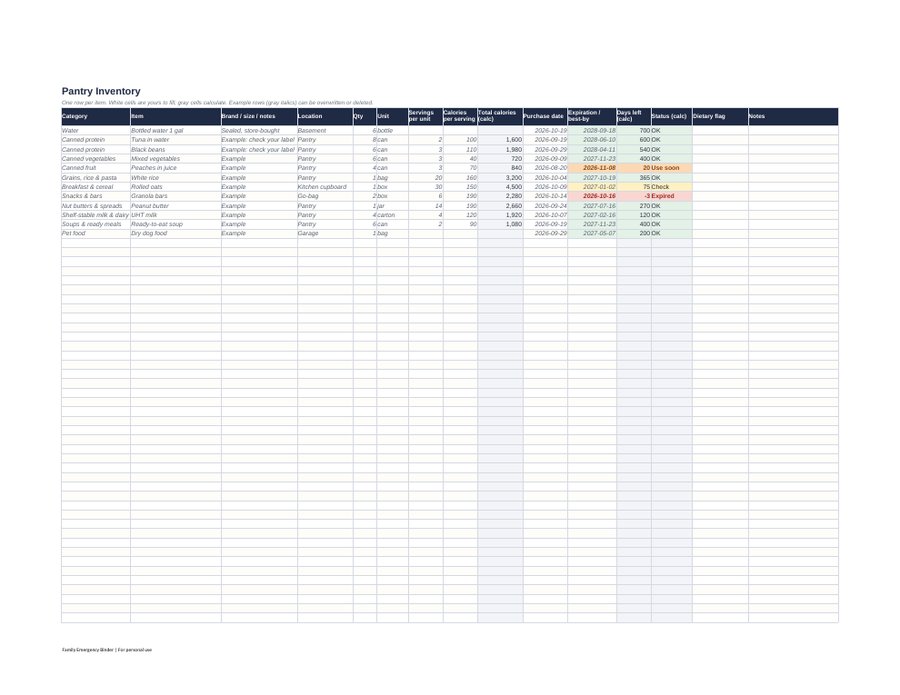
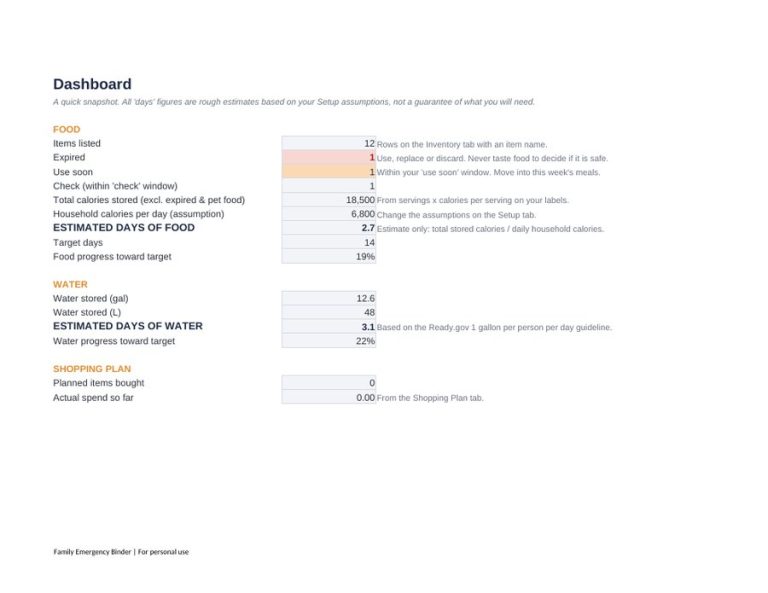
You can absolutely build the sheet above yourself in a few minutes. If you would rather start with one already set up, I included a Pantry & Food Storage Planner spreadsheet (Excel or Google Sheets) in the Family Emergency Binder + 72-Hour Kit & Pantry Planner. Its Inventory tab has 300 rows with columns for category, location, quantity and expiration date, works out the days left, and marks each item as expired, use soon, check or OK. A Dashboard gives a rough estimate of days of food and water for your household size, and drop-down lists keep categories and locations consistent. See the details here.
FAQ
How often should I update my pantry inventory?
I update weekly from a paper sheet on the pantry door, glance at dates monthly, and do a full recount once a year. That balance keeps it accurate without taking over your weekend.
Do I need an app to track pantry inventory?
No. A spreadsheet, a printed sheet or a notebook works well. Choose whatever your household will actually use.
Should I throw away food past its best-by date?
According to the USDA, “Best if Used By” dates generally indicate quality rather than safety, except for infant formula. Check the food and packaging for signs of spoilage or damage, and follow FSIS guidance on damaged cans.
Should emergency food be tracked separately from everyday food?
I keep them on one list with a “location” column. That way emergency food gets rotated into everyday meals instead of being forgotten.
Conclusion
To track pantry inventory without burning out, keep it simple: track only the categories that matter, use a handful of columns, set target quantities based on official guidance, and follow a light weekly, monthly and yearly routine. The result is less waste, fewer duplicate purchases, and a clear picture of how prepared your household is.
Disclaimer: This article provides general preparedness information only. It is not professional, legal, medical, or financial advice. Always follow the guidance of your local authorities and emergency services.
One Comment
Comments are closed.